Behavior Trees
A behavior tree is a way to describe what a robot should do as a tree of small steps. It is how we write autonomous routines: "drive this path, then aim, then shoot, and if aiming takes too long, drive to the backup spot instead."
Where a state machine answers "what mode is the robot in right now?", a behavior tree answers "what should happen, in what order, and what if a step goes wrong?" The two work together on our robot: the tree decides the order and handles failure, and the steps it runs mostly ask the robot's own state machine for a state.
Watch the tick counter in the top left, the bright ring (where the tick is right now), the bright edges (the path it took), and the badge on each node (its status). The caption says what just happened.
A Tree of Steps
Every box in the tree is a node. Nodes at the bottom do real work and are called leaves. Nodes that hold other nodes decide how their children run. Here is a real-looking auto:
Read it from the top, left to right:
- The Sequence runs its children in order.
- First it drives to the pickup.
- Then the Fallback tries to aim, but only for 3 seconds (the Timeout). If aiming fails or runs out of time, the Fallback gives up on it and drives to the backup spot instead.
- Finally it shoots.
The boxes that hold other boxes (Sequence, Fallback, Timeout) are the control flow. The blue boxes are the actions that actually move the robot. All the cleverness in a behavior tree is in how the control flow combines simple actions.
Ticks and Statuses
A behavior tree does not run once and finish. The robot's main loop ticks the tree about fifty times a second. Each tick starts at the root and travels down into the tree. Every node it visits answers with one of three statuses:
| Status | Meaning | Example |
|---|---|---|
| RUNNING | "I'm not done yet, ask me again next tick." | Driving a path, until the robot arrives |
| SUCCESS | "I'm done, and it worked." | The path reached its end; the condition is true |
| FAILURE | "I'm done, and it didn't work." | A target was not found; a timeout ran out |
The answers travel back up the tree, and each control node uses its children's answers to decide what to do and what to answer its parent.
A node is not always in the middle of something. Between runs it is idle, and a node that finishes goes back to idle once its parent has finished with it:
Halted is worth remembering: if a node is RUNNING and its parent decides it should stop (a timeout, a failed condition, a sibling that finished first), the parent halts it and it goes straight back to idle. A well-written action cleans up when it is halted, which is why a path-following node can stop the robot when something else wins.
The Kinds of Nodes
| Kind | Children | What it does |
|---|---|---|
| Control | Several | Runs its children in a pattern: in order, until one works, all at once... |
| Decorator | Exactly one | Wraps a child and changes how it runs or what it reports (a time limit, a retry, "flip the answer") |
| Action | None | Does something: ask the robot for a state, follow a path, wait |
| Condition | None | Answers SUCCESS or FAILURE right away, never RUNNING: "do we have a game piece?" |
| SubTree | None | Runs another tree by name, so a block like "shoot for two seconds" is written once and used everywhere |
Sequence: Do These in Order
A Sequence runs its children one after another. It moves on to the next child when the current one succeeds. When a child answers RUNNING the Sequence answers RUNNING too, and next tick it resumes at that same child, not at the start.
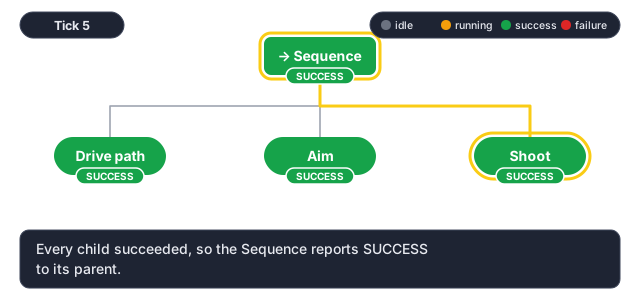
The Sequence is only SUCCESS when all of its children succeeded. But the moment one of them fails, it gives up:
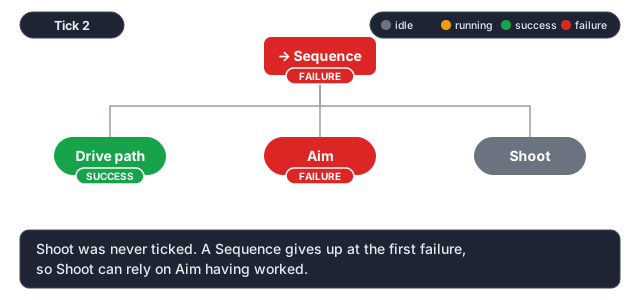
This is why a Sequence is the natural way to write "do A, then B, then C, but only if each one worked". Because Shoot is only reached after Aim succeeded, Shoot never has to check whether Aim worked.
Fallback: Try Until Something Works
A Fallback is "plan B" (some people call it a selector). It tries its children in order and stops at the first one that succeeds. It only fails if every child failed.
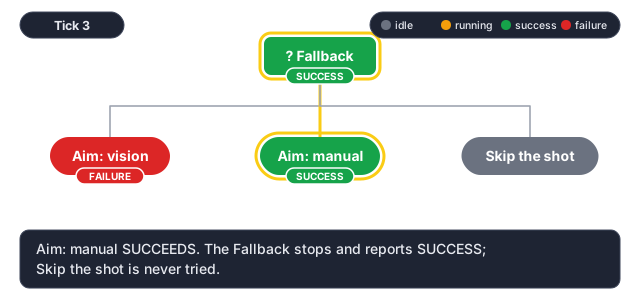
It is the mirror image of a Sequence:
| Moves on to the next child when... | Stops early when... | Is SUCCESS when... | Is FAILURE when... | |
|---|---|---|---|---|
| Sequence | a child succeeds | a child fails | all children succeeded | any child failed |
| Fallback | a child fails | a child succeeds | any child succeeded | all children failed |
A Sequence is "AND"; a Fallback is "OR".
Reactive Sequence: Keep Checking
A plain Sequence remembers where it was. That is usually what you want, but sometimes a condition needs to stay true the whole time an action runs: "keep driving only while we still hold the game piece."
A ReactiveSequence ticks all of its earlier children again on every tick, starting from the first. If a condition that used to pass now fails, the running action after it is halted.
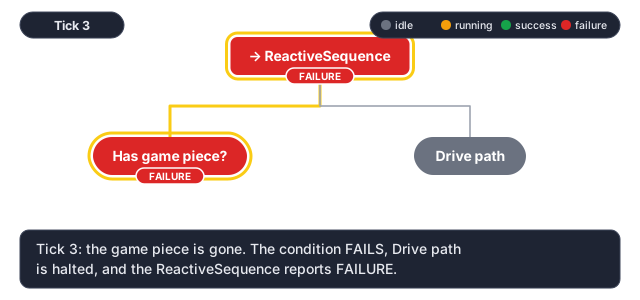
A ReactiveSequence is meant for "some conditions, then one long action". Two children that both take several ticks would keep halting each other, and MW-Lib reports an error if it happens.
Parallel and ParallelDeadline: At the Same Time
Control nodes do not have to run children one at a time. A Parallel ticks all of its children on every tick and finishes based on how many succeeded or failed. Our own ParallelDeadline is the version autos use most: the first child is the deadline. When it finishes, every other child is halted, and the node reports the deadline's result.
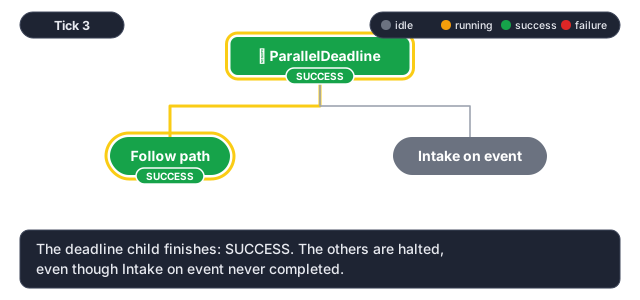
That is exactly what "drive this path, and drop the intake when the robot passes the marker" needs: the path is the deadline, and the intake branch is just along for the ride. If the robot reaches the end of the path before the marker ever fires, the waiting branch is stopped instead of hanging the auto.
Decorators: Change How a Child Runs
A decorator has exactly one child and modifies it. The one you will use most is Timeout: it gives its child a time limit, and if the child is still RUNNING when time is up, it halts the child and reports FAILURE.
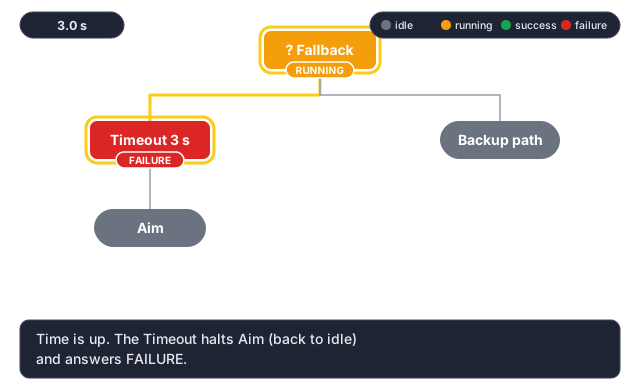
Put a Timeout under a Fallback and a step that might never finish becomes a step that fails after three seconds, which the Fallback turns into a plan B. This is the single most useful pattern in an auto.
| Decorator | What it does |
|---|---|
Timeout msec | Halts the child and fails if it runs longer than msec |
Delay delay_msec | Waits, then runs the child |
RetryUntilSuccessful num_attempts | Runs the child again if it fails, up to a limit |
Repeat num_cycles | Runs the child several times in a row |
Inverter | Swaps SUCCESS and FAILURE ("is the shooter not ready?") |
ForceSuccess / ForceFailure | Reports a fixed result whatever the child did ("try this, but never let it fail the auto") |
RunOnce | Runs the child the first time only |
Ports and the Blackboard
Nodes take settings called ports, filled in on Arbor's inspector: Sleep has msec = 500. A port can hold a
fixed value, or point at a named slot in a shared notebook called the blackboard, written with braces:
msec = {wait_msec}.
A port declared for the tree, with a default, shows up on the dashboard, so the team can change a wait time at the
field without rebuilding the code. The SubTree node uses the same idea to pass values into a reusable block:
a SubTree of ShootFor with duration_msec = 2000.
If a node reads {wait_msc} and nothing ever sets it, the auto refuses to load and says which node, instead
of waiting until mid-match to read a missing value.
How a Tree Talks to the Robot
Most leaves in an auto do not drive motors themselves. SetWantedState asks the robot's state machine
(RobotContainer) for a robot state. It is an instant request, like the driver pressing a button: it succeeds the same
tick. To wait until the robot gets there, the tree retries the condition IsSystemState, which succeeds once the
robot is in the state, inside a Timeout so it can't wait forever:
├─ SetWantedState                      state = AIM
└─ Timeout                             msec = 3000
   └─ RetryUntilSuccessful             num_attempts = -1
      └─ IsSystemState                 state = AIM
Because the driver's buttons ask for the same robot states, the aim-spin-up-feed sequence is written once, in
RobotContainer, and used by both teleop and autos. The tree adds what only an auto needs: the wait, a Timeout so
aiming can fail, and a Fallback for what to do then. See The Super State Machine.
Reading a Real Auto
Putting it all together, here is an example in the style of our autos, and what each part does. Decorators (Timeout, RetryUntilSuccessful) are drawn as frames around the child
they wrap, and the edge labels give each child's place in its parent:
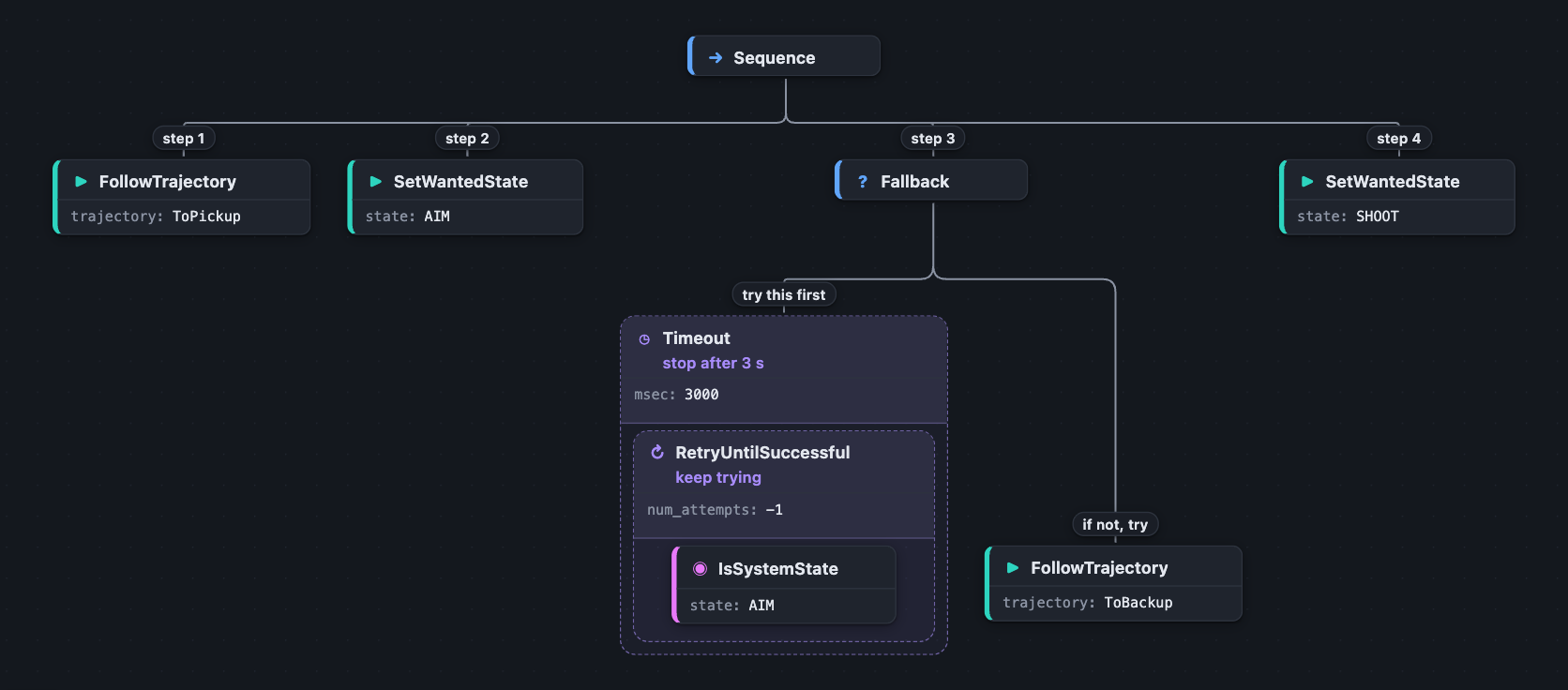
When you are not sure what a tree will do, trace one tick by hand: start at the root, ask "what does this node do with each child's answer?", and follow the RUNNING answers down to the node that is actually busy.
Seeing It Run
Arbor shows exactly these animations for a real robot: connect to the robot or the simulator and each
node turns orange while it is RUNNING, then green or red. If an auto stops where you did not expect, the node
that is red, or the one that stayed orange, is where to look. The .btlog files the robot writes can be replayed there
afterwards, one tick at a time.
| Looks like | Usually means |
|---|---|
| A Sequence is red, the last children never lit up | A child before them failed; the rest were skipped on purpose |
| One node stays orange forever | That step never finishes. Wrap it in a Timeout and give the Fallback a plan B |
| The whole tree is green but the robot did not do the thing | The step succeeded without doing the work: check it asked for the right state or path name |
| An auto does nothing and Arbor shows no colours | The file failed to load: look at BehaviorTree/<auto>/Error and the Elastic alert |
Practice
The Arbor lesson in Scriptum walks you through building a tree: a Sequence of three steps, a Timeout with a Fallback, and a tunable wait time. The Autonomous lesson then builds a real routine the same way.
Related Documentation
- Autonomous: our behavior-tree autos: layout, nodes, wiring and debugging.
- State Machines: the robot states a tree asks for.
- Arbor: the editor and live viewer.
- BehaviorTree.CPP: the open-source library whose file format and node semantics ours follows.